
AgriStack Farmer ID 2026: Registration, Login, Status Check and Card Download (All States)
Your Farmer ID is the 11-digit number that now unlocks PM-Kisan, Kisan Credit Card loans, MSP procurement and crop insurance. If you don’t have it yet, or your application is stuck, this guide walks you through every step: sign up, log in, check your status, download the card, and fix the errors that block most farmers.
Registration is free. It takes about 15 minutes on a smartphone, at a CSC centre, or at a village camp. You only need your Aadhaar, the mobile number linked to it, and your land record numbers.
Quick answer: How do I get my AgriStack Farmer ID? Open your state’s Farmer Registry portal (it always ends in agristack.gov.in), choose Farmer, click Create New User Account, and verify your Aadhaar with OTP. Then log in, add every land plot by khasra, gata or survey number, and e-sign with a final OTP. Save the Enrollment ID. After officials verify your land, your 11-digit Farmer ID arrives by SMS.
AgriStack Farmer ID at a glance
| Item | Detail |
|---|---|
| Official name | Farmer ID / Kisan Pehchaan Patra / Farmer Registry ID |
| Issued under | AgriStack, Digital Agriculture Mission, Ministry of Agriculture and Farmers Welfare |
| ID format | 11 digits (10 digits + 1 check digit) |
| Who registers | Land-owning farmers; tenants and sharecroppers in states that allow it |
| Documents | Aadhaar, Aadhaar-linked mobile, land record numbers |
| Fee | Free (CSC may charge a small service fee) |
| Time to apply | 10–15 minutes |
| Time to approve | Same day for auto-approved cases; up to 3–4 weeks where field checks are needed |
| Official portals | State sites ending in agristack.gov.in (table below) |
| Farmer IDs created | Over 10 crore nationwide; UP alone crossed 2.47 crore by 6 August 2026 [Nov 2026] |
State-Wise Official AgriStack Farmer Registry Portals (2026)
Every state runs its own Farmer Registry portal on the agristack.gov.in domain. Use the link for the state where your land is, not where you live. All of them are free.
State-Wise Official AgriStack Farmer Registry Portals (2026)
Use the portal of the state where your land is. All portals are free and end in .gov.in.
| State | Portal name | Official website | Land record used |
|---|---|---|---|
| Uttar Pradesh | UP Farmer Registry (UPFR) | upfr.agristack.gov.in | Khatauni, gata number |
| Maharashtra | Maharashtra Farmer Registry (MHFR) | mhfr.agristack.gov.in | 7/12 extract |
| Madhya Pradesh | MP Farmer Registry (MPFR) | mpfr.agristack.gov.in | Khasra |
| Gujarat | Gujarat Farmer Registry (GJFR) | gjfr.agristack.gov.in | Survey number, 7/12 |
| Rajasthan | Rajasthan Farmer Registry (RJFR) | rjfr.agristack.gov.in | Jamabandi, khasra |
| Bihar | Bihar Farmer Registry (BHFR) | bhfr.agristack.gov.in | Khata, khesra |
| Odisha | Odisha Farmer Registry (ODFR) | odfr.agristack.gov.in | Record of Rights (RoR) |
| Chhattisgarh | CG Farmer Registry (CGFR) | cgfr.agristack.gov.in | Khasra (Bhuiyan) |
| Telangana | Telangana Farmer Registry (TLFR) | tlfr.agristack.gov.in | Pahani, survey number |
| Andhra Pradesh | AP Farmer Registry (APFR) | apfr.agristack.gov.in | Survey number (Adangal) |
| Tamil Nadu | TN Farmer Registry (TNFR) | tnfr.agristack.gov.in | Patta, survey number |
| Himachal Pradesh | HP Farmer Registry (HPFR) | hpfr.agristack.gov.in | Jamabandi, khasra |
| Tripura | Tripura Farmer Registry (TRFR) | trfr.agristack.gov.in | Khatian |
| Assam | Assam Farmer Registry | [verify current URL] | Dag, patta number |
| West Bengal | WB Farmer Registry (WBFR) | wbfr.agristack.gov.in [verify] | Khatian, plot number |
| Karnataka | FRUITS | fruits.karnataka.gov.in | RTC, survey number |
| Kerala | AIMS | aims.kerala.gov.in | Thandaper, survey number |
| All other states & UTs | National AgriStack | agristack.gov.in | — |
Safety check: Type the address yourself. If it does not end in .gov.in, close it. agristack.com.in is a private guide, not a government portal.
What Is AgriStack?
Quick answer: AgriStack is the Government of India’s digital database for agriculture. It keeps one verified record of each farmer, each land plot and each crop sown, so banks, PM-Kisan, procurement centres and insurance all read the same data. It is built under the Digital Agriculture Mission by the Ministry of Agriculture and Farmers Welfare, and each state runs its own part.
Before AgriStack, a farmer carried the same khatauni copies to the bank, the PM-Kisan office and the mandi. Every department kept its own list, and the lists rarely matched. Now your identity and land are checked once, and every scheme reads that one record.
The Union Cabinet approved the Digital Agriculture Mission in September 2024 with a budget of ₹2,817 crore. AgriStack is its core.
The 3 Registries Inside AgriStack
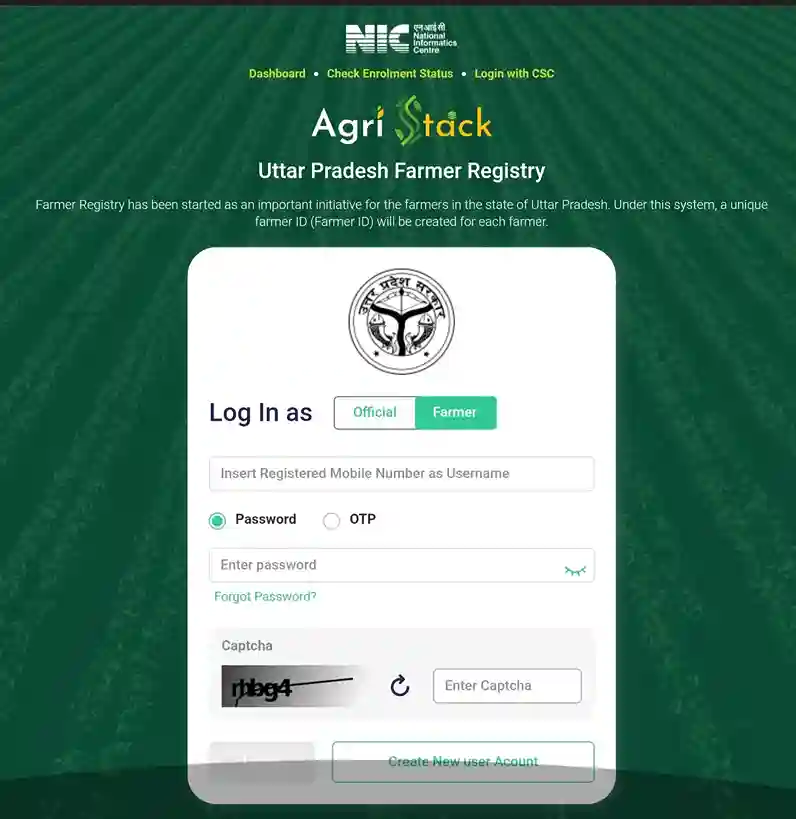
1. Farmers Registry
This is the part you register in. It links your Aadhaar, mobile number and land plots, and gives you the Farmer ID.
2. Geo-Referenced Village Maps
Old paper village maps are being turned into GPS-accurate digital maps. Each plot gets an exact location, which helps settle boundary disputes and lets crops be measured by satellite.
3. Crop Sown Registry (Digital Crop Survey)
Every season, the crop on each plot is recorded with a photo and GPS. MSP procurement limits, crop insurance claims and disaster relief are all checked against this record.
This is the core database and the one you interact with when you register. Every farmer who completes registration gets a unique 11-digit Farmer ID linked to Aadhaar and to land records. People call it the “Aadhaar for farmers” and the comparison is fairly accurate: one person, one permanent number, valid across all departments and all schemes.
The registry stores your Aadhaar-verified name and photo, your mobile number, every land parcel you own with its survey or khasra number, your social category where recorded, and links to schemes you receive. When you buy or sell land, the change flows into the same record through the state land record system. You never create a second ID.
2. Geo-referenced village maps
The second registry connects every land parcel to its exact position on a digital map. Old cadastral maps drawn on cloth and paper are being converted into GPS-accurate digital maps village by village. Once your plot is geo-referenced, there is no argument about where survey number 142 begins and ends. This layer quietly solves boundary confusion that has fed land disputes for generations, and it lets the government measure crop area from satellite images plot by plot.
3. Crop Sown Registry (Digital Crop Survey)
The third registry records which crop stands on which plot in every season. Earlier, the patwari wrote crop details in a register during girdawari, often without visiting the field. Now the entry is made digitally at the plot, with GPS and photo proof, either by survey staff or by the farmer through a mobile app depending on the state.
This registry decides real money. MSP procurement limits come from it: if your plot shows two acres of paddy, the centre buys paddy from you against two acres, not five. Crop insurance claims are checked against it. Drought and flood relief lists are prepared from it. A wrong or missing crop entry can block your payment even when your Farmer ID is perfect, so treat the seasonal crop survey as seriously as the registration itself.
What the Farmer ID Is Linked To
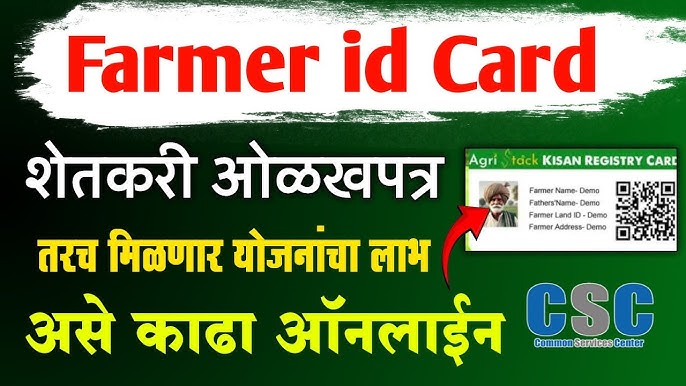
- Your Aadhaar-verified name, photo and date of birth
- Your Aadhaar-linked mobile number
- Every land plot you own or cultivate, with village, tehsil and district
- Your farmer category and social category (if you choose to record it)
- The schemes you receive, added as departments connect
How the 11-Digit Number Works
The first 10 digits identify you; the last digit is a check digit that catches typing mistakes. You get one ID only, no matter how many plots or districts your land is in. Joint owners each get their own ID for their own share.
Why You Need It in 2026
| Scheme / service | What the Farmer ID does |
|---|---|
| PM-Kisan (₹6,000/year) | Required for new applicants; existing beneficiaries are being asked to link it |
| Kisan Credit Card | Bank verifies your land instantly; faster loans and renewals |
| MSP procurement | Confirms your land and sown area at the procurement centre |
| PMFBY crop insurance | Claims are matched against your crop survey entry |
| State subsidies (MahaDBT, iKhedut, etc.) | Form fills automatically from your Farmer ID |
| Disaster relief | Payment lists are made from the registry, without fresh applications |
Who Can Register? (Eligibility)
Quick answer: Any Indian farmer whose name is in the state land records can register. Joint owners and women co-owners register separately for their share. Tenant farmers and sharecroppers can register only in states that have opened tenant registration. Landless labourers are not covered in most states yet.
Land-Owning Farmers
Eligible everywhere. Your name in the land record must match your Aadhaar closely.
Joint Owners and Women Farmers
Every person named in the land record should create their own Farmer ID. One brother’s registration does not cover the others.
Tenant Farmers and Sharecroppers
Allowed in some states with a tenancy agreement, cultivation certificate or village officer’s declaration. Ask your krishi sahayak or agriculture office whether it is open in your area.
Land in a Deceased Parent’s Name
Complete the mutation (varasat, ferfar, namantaran) first, then register. Some states allow a declaration for legal heirs at camps.
Documents Required for Farmer Registry
You usually upload nothing: the portal pulls your land records automatically. But keep these ready.
- Aadhaar card. The name should match the land record. Small spelling differences usually pass.
- Mobile number linked to Aadhaar. Every OTP goes here. This is the number-one reason registrations fail.
- Land record numbers. Khasra, gata, survey or patta number from a fresh copy of your khatauni, 7/12, pahani or RoR.
- Bank passbook. To confirm your DBT account is Aadhaar-seeded.
- Caste certificate (optional), only if you want your category recorded.
- Tenancy or cultivation certificate, only for tenant farmers where allowed.
Full guide: Farmer ID eligibility and documents →
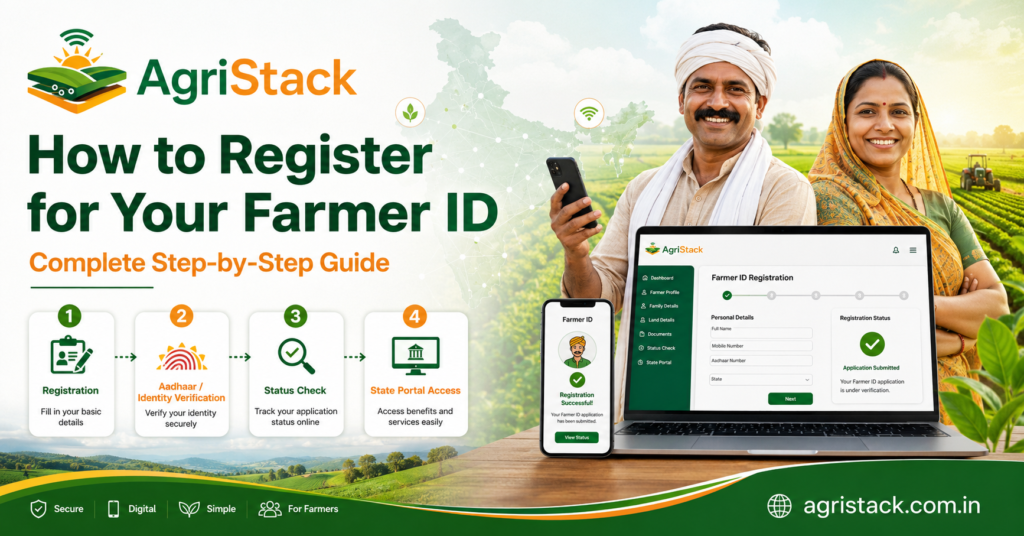
There are three routes: doing it yourself online, going through a CSC centre, or attending a village camp. All three feed the same registry and produce the same ID. Pick whichever suits you.
How to Register for AgriStack Farmer ID (Sign Up Step by Step)
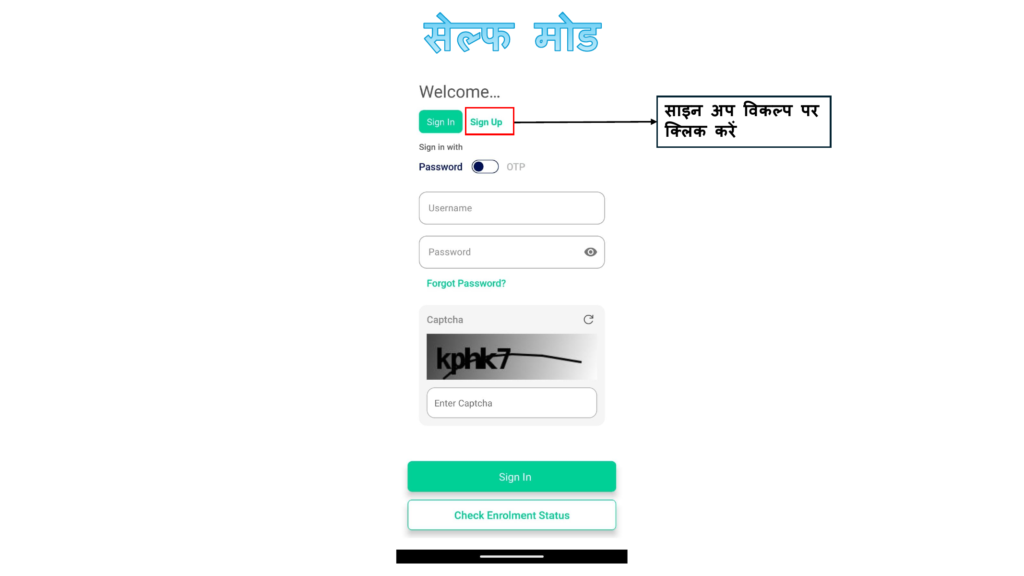
Quick answer: There are 3 ways to register: online yourself, at a CSC (Jan Seva Kendra), or at a village camp. All three create the same Farmer ID. Online registration takes 10–15 minutes and needs your Aadhaar-linked phone in hand for 3 OTPs.
Method 1: Online Self-Registration (Mobile or Computer)
Best if your Aadhaar-linked SIM is working and you can follow on-screen steps in Hindi, English or your state language.
Step 1: Open Your State Portal
Type your state’s address from the table above, for example upfr.agristack.gov.in. Check that it ends in agristack.gov.in.
[Screenshot: state portal home page with the Farmer option highlighted]
Step 2: Choose “Farmer” and Click “Create New User Account”
The home page shows options for Farmer, Official and CSC. Pick Farmer, then Create New User Account (on some portals it says Sign Up).
Step 3: Enter Aadhaar and Verify With OTP (eKYC)
Enter your 12-digit Aadhaar, tick the consent box and enter the OTP sent to your Aadhaar-linked mobile. Your name, photo and address fill in automatically.
If the OTP does not arrive
Stop here. Your mobile is not linked to Aadhaar, or an old number is. See OTP not received in the troubleshooting section.
Step 4: Set Mobile Number and Password
Confirm your mobile number with a second OTP and create a password. Write the password down; you will need it for status checks and the card download.
Step 5: Log In and Click “Register as Farmer”
Log in with your mobile number and password. Fill in farmer type (owner or tenant), social category and address. Most of it is choosing from dropdown lists.
Step 6: Add Every Land Plot
Select district, tehsil and village, then search your plot by khasra, gata or survey number. Find your own name in the owner list, select it, and add the plot. Repeat for every plot, including plots in other villages.
Joint land
Select only your own name and share. Never select the whole plot or another owner’s name.
Land still in a parent’s name
Don’t pick someone else’s plot to fill the gap. Finish the mutation first, or use the legal-heir option if your state offers it.
[Screenshot: land parcel search screen]
Step 7: Review and e-Sign With Aadhaar OTP
Check your name, plot numbers and total area against your land record. Tick the declaration and confirm with the final Aadhaar OTP (Farmer Consent – eSign).
Step 8: Save Your Enrollment ID
The screen shows your Enrollment ID, and it also comes by SMS. Take a screenshot. You need it to track your application.
Step 9: Wait for Approval
If your details match the land record, approval can be automatic and quick. Otherwise, the agriculture officer and patwari/lekhpal/talathi check it, which takes a few days to 3–4 weeks. Your 11-digit Farmer ID then arrives by SMS.
Method 2: Register at a CSC / Jan Seva Kendra
Good if you are not comfortable with online forms or your OTP isn’t working.
What to Carry
- Aadhaar card
- The phone with your Aadhaar-linked SIM (OTPs come to it)
- Your khatauni / 7/12 / pahani copy or plot numbers
What Happens There
The operator logs in with Login with CSC and completes the same steps for you. Many CSCs can use fingerprint eKYC if your OTP isn’t working.
Fee and Safety Checks
The government fee is zero. The CSC may charge a small service fee fixed by the state. Before you leave:
- Take the printed slip with your Enrollment ID
- Check the operator entered your mobile number, not his own
Method 3: Village Registration Camp (Shivir)
Agriculture staff, the patwari/lekhpal and CSC operators sit together in the village. This is the best route for elderly farmers, name-mismatch cases, inherited land and weak-network villages, because the revenue official can fix record issues on the spot. Ask your gram panchayat or krishi sahayak for the next camp date.
Full guide: Farmer registration with screenshots →
AgriStack Farmer Registry Login
Quick answer: Open your state portal, choose Farmer, and log in with the mobile number and password you set during sign-up. Some portals also allow OTP login. If you forgot your password, use Forgot Password; the reset OTP goes to your Aadhaar-linked mobile.
Farmer Login Steps
- Open your state portal (for example mhfr.agristack.gov.in).
- Select Farmer.
- Enter your mobile number and password, or choose OTP login if shown.
- Enter the captcha and click Login.
- Your dashboard shows your Enrollment ID, status, Farmer ID and download options.
CSC Login (for CSC Operators / VLEs)
CSC operators use the Login with CSC button on the same portal with their CSC Connect credentials. From the CSC dashboard they can register farmers, check status and print cards. Farmers should not use this option.
Official and Department Login
The Official option is for agriculture and revenue staff who verify applications. Farmers do not need it.
Forgot Password or Can’t Log In
Reset Your Password
- Click Forgot Password on the login page.
- Enter your registered mobile number or Aadhaar.
- Enter the OTP and set a new password.
Registered at a CSC and Never Got a Password
Use Forgot Password with your own mobile number. If it fails, the CSC operator probably entered his number. Ask a CSC or the agriculture office to correct the mobile number in your record, then reset.
Full guide: Farmer Registry login help →
How to Check Farmer Registry Status (Enrollment Status)
Quick answer: Open your state portal and click Check Enrollment Status. Enter your Enrollment ID (most portals also accept Aadhaar). The status shows Pending, Approved, Rejected or Returned. If Approved, your 11-digit Farmer ID is shown and you can download the card.
Status Check Steps
- Open your state Farmer Registry portal.
- Click Check Enrollment Status on the home page (no login needed on most portals).
- Enter your Enrollment ID or Aadhaar number and the captcha.
- Click Check / Submit and read the result.
What Each Status Means
| Status | Meaning | What to do |
|---|---|---|
| Pending / Under Verification | Officials haven’t finished checking | Normal for 1–2 weeks; check again weekly |
| Approved / Farmer ID Generated | Your ID is ready | Log in and download your card |
| Returned | Sent back for a correction | Read the remark, fix it, resubmit |
| Rejected | Details didn’t match land records | Fix the reason in the remark, apply again |
| No record found | Your submission never completed | Register again from the start |
Forgot Your Enrollment ID?
Search your SMS inbox for the message sent on the day you applied. Most portals also accept Aadhaar in the status search. A CSC operator or krishi sahayak can also find it for you.
Pending for More Than a Month?
Take your Enrollment slip to the block agriculture office and ask which officer’s login holds your file. A visit usually moves it.
Full guide: Farmer ID status check →
How to Download Your Farmer ID Card (PDF)
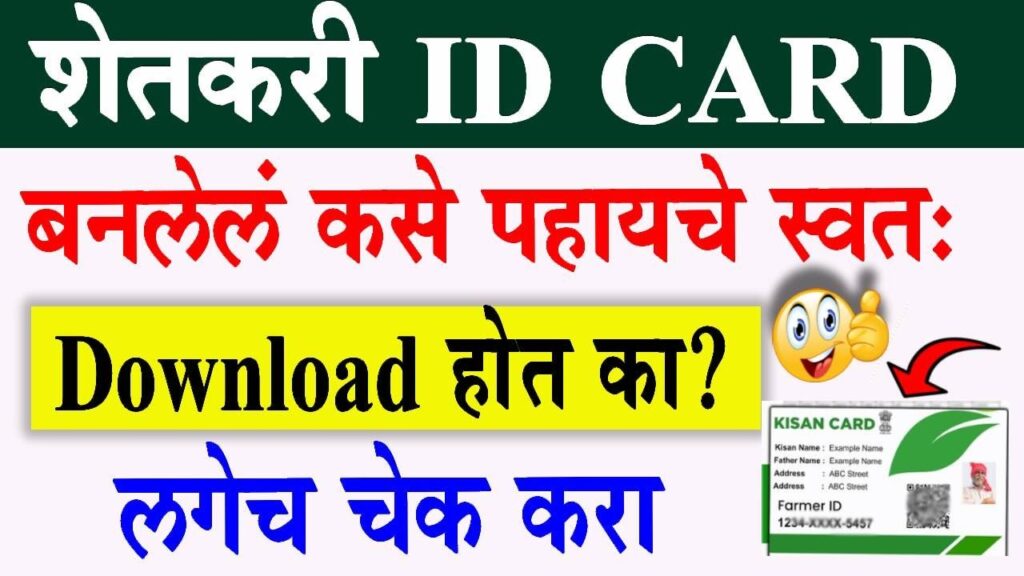
Quick answer: After approval, log in to your state portal, open your dashboard and click Download Farmer ID (some portals say Print or View Farmer Details). A PDF opens with your photo, name, 11-digit Farmer ID and a QR code. Save it and print one colour copy.
Card Download Steps
- Log in to your state portal with mobile number and password.
- Open your dashboard; your Farmer ID is shown.
- Click Download Farmer ID / Print / View Farmer Details.
- Save the PDF on your phone and in DigiLocker or email.
- Print one colour copy and keep it with your Aadhaar and bank passbook. Don’t fold it across the QR code.
What’s on the Card
| Element | What it shows |
|---|---|
| Photo and name | Taken from Aadhaar |
| 11-digit Farmer ID | Your permanent number |
| QR code | Officials scan it to see your verified details |
| Land details | Plots linked to your ID (on some state cards) |
Is a PVC Farmer ID Card Needed?
No. The PDF printout is valid. A PVC card from a private shop is optional and not an official document.
Full guide: Farmer ID card download →
Farmer Registry Errors and Troubleshooting
Quick answer: Most Farmer Registry problems come from four things: OTP going to an old mobile number, a name mismatch between Aadhaar and land records, land still in a deceased parent’s name, or a slow portal during deadline weeks. Find your error below for the exact fix.
Quick Error Finder
| Error you see | Most likely cause | Fix |
|---|---|---|
| OTP not received | Mobile not linked to Aadhaar | Update mobile at Aadhaar Seva Kendra, wait 2–3 days |
| “Aadhaar authentication failed” | Wrong number or UIDAI server down | Recheck Aadhaar; try later or use fingerprint at CSC |
| “Land record not found” | Wrong plot number or village | Check a fresh land record copy |
| “Name mismatch” | Aadhaar and land record names differ | Correct Aadhaar or land record |
| “Already registered” | An ID or application exists for your Aadhaar | Check status with Aadhaar |
| Page stuck on loading | Portal overloaded | Try early morning or late night |
| Login failed / invalid password | Wrong password or operator’s number | Forgot Password; correct mobile at CSC |
| Download button missing | ID not yet approved | Check status; wait for approval |
OTP and Aadhaar Errors
OTP Not Received
The OTP only goes to the mobile number linked to your Aadhaar.
If you changed your SIM
Update the number at an Aadhaar Seva Kendra. Wait 2–3 days for it to update, then try again.
If the number is correct
Check network signal and SMS inbox space, wait 2 minutes, then click Resend once. Don’t click it repeatedly; portals may block you for a while.
If you need to register today
Go to a CSC that offers fingerprint (biometric) eKYC.
“Aadhaar Authentication Failed” or eKYC Error
Recheck the 12 digits. If the number is right, the UIDAI server may be busy. Try again after an hour. Repeated failures with fingerprint mean your biometrics may need an update at Aadhaar Seva Kendra.
“Mobile Number Already Registered”
That number is already tied to another account, often a family member or a CSC operator. Use a different Aadhaar-linked number or ask the agriculture office to free it.
Land Record Errors
“Land Record Not Found” / Plot Not Showing
- Check you selected the correct district, tehsil and village. Many villages share a name, so match the village name on your land record.
- Recheck the khasra, gata or survey number on a fresh copy of your land record.
- If it still doesn’t show, your village records may not be fully online. Report it at the tehsil or to your krishi sahayak.
Name Mismatch Between Aadhaar and Land Record
Small spelling differences (Ramkumar vs Ram Kumar) usually pass. Big differences need a correction. Correcting Aadhaar is usually faster than correcting land records. If the land record has the correct full name, update Aadhaar to match it.
Land in a Deceased Parent’s or Grandparent’s Name
Apply for mutation (varasat in UP, ferfar in Maharashtra, namantaran in MP/Rajasthan). Register after your name appears in the record. Watch for state mutation drives, when this happens in days.
Wrong Area or Share Showing
The portal only shows what the land record holds. Get the land record corrected at the tehsil; the registry updates after that.
Application and Status Errors
Application Rejected
Read the rejection remark on the status page. The usual reasons are a name mismatch, wrong plot selected, or a failed land check. Fix that one issue and apply again. Your krishi sahayak can see the full internal remark.
Application Returned for Correction
Log in, open the application, make the change the remark asks for, and e-sign again.
Status Shows “No Record Found”
The final e-sign OTP probably failed and the application never submitted. Register again from Step 1.
Pending for Weeks
Visit the block agriculture office with your Enrollment ID. Approval queues are often stuck on one officer’s login.
Login and Portal Errors
Invalid Password or Can’t Log In
Use Forgot Password. If the OTP goes to a number you don’t recognise, the CSC operator entered his own number; get it corrected at a CSC or agriculture office.
Portal Not Opening, Slow or Stuck
Portals slow down during camps and deadline weeks. Try between 6–9 AM or after 10 PM, use Chrome, clear the browser cache, and avoid the last days before any announced deadline.
Captcha Not Loading
Refresh the captcha or the page. Turn off data saver or ad blockers.
PM-Kisan and Linking Errors
Farmer ID Approved but PM-Kisan Installment Stopped
Three things must all be done:
- Farmer ID linked in your PM-Kisan record
- PM-Kisan eKYC complete on pmkisan.gov.in or at a CSC
- Bank account Aadhaar-seeded (check at your branch)
The installment usually resumes in the next cycle once all three are done.
Farmer ID Not Showing in PM-Kisan
Ask a CSC operator to link it, or check your beneficiary status on pmkisan.gov.in after a few days.
Still stuck? Your krishi sahayak, the block agriculture office or a CSC can see the portal from the inside and fix most problems on the spot.
Uttar Pradesh (UPFR)

The largest registry in India: 2,47,59,182 Farmer IDs by 6 August 2026, according to official figures [update monthly]. Plots are searched by gata number from your khatauni (upbhulekh.gov.in). The old kisan panjikaran on upagriculture.com does not convert; register fresh on UPFR. Full UP guide →
Maharashtra (MHFR)
Land is verified against the 7/12 extract. The Farmer ID is needed for MahaDBT subsidy applications. Clear any pending ferfar before registering. Full Maharashtra guide →
Madhya Pradesh (MPFR)
Khasra-based verification, linked with e-Uparjan for wheat and paddy procurement. Register before the procurement season opens. Full MP guide →
Gujarat (GIFR)
Runs on gjfr.agristack.gov.in alongside iKhedut for scheme applications. Survey-number based verification. Full Gujarat guide →
Rajasthan (RJFR)

Rajasthan registers farmers on rjfr.agristack.gov.in. The state already had strong digital plumbing through Jan Aadhaar, so many farmer details pre-fill. Rajasthan links the Farmer ID with its crop loan waiver history and cooperative credit records. Desert districts had special camps because CSC density is lower there.
Bihar (BHFR / Agristack Bihar)
The old 13-digit DBT Agriculture number is not the Farmer ID; Bihar farmers need the new 11-digit ID too. Add every small plot. Full Bihar guide →
Odisha (Krushak Odisha)
The AgriStack registry runs on odfr.agristack.gov.in, while Krushak Odisha holds the older KALIA-era database. For paddy procurement, the Agristack ID is needed at the token stage. Full Odisha guide →
Telangana (Rythu ecosystem)
Runs on tlfr.agristack.gov.in. Land records come from the state land portal and pahani entries; Rythu Bharosa payments depend on recorded land. Full Telangana guide →
Andhra Pradesh, Karnataka, Kerala, Tamil Nadu, West Bengal and Others
AP farmers register mostly through village Rythu Seva Kendras. Karnataka uses FRUITS, Kerala uses AIMS through Krishi Bhavans, and Tamil Nadu is moving from TN Agrisnet to TNFR. West Bengal runs Krishak Bandhu alongside its registry rollout. All states →
Digital Crop Survey: Keep Your Farmer ID Useful
Quick answer: Every kharif and rabi season, the crop on each of your plots must be recorded in the Digital Crop Survey. MSP sales, crop insurance and relief payments read this entry. A missing or wrong entry can block payment even if your Farmer ID is perfect.
How the Survey Works
Survey staff (or the farmer, in states with self-survey apps) record the crop, area and a GPS photo at each plot.
What You Should Do Each Season
- Be available at the field during survey time
- Ask your patwari or krishi sahayak whether all your plots were surveyed
- Get a wrong entry corrected within that season’s correction window
What to Do After You Get Your Farmer ID
- Link it with PM-Kisan and complete eKYC.
- Check your bank account is Aadhaar-seeded for DBT.
- Give the ID to your bank for KCC loans and renewals.
- Keep your Aadhaar mobile active. Update Aadhaar first if you change SIMs.
- Recheck after any land change (purchase, sale, partition, mutation).
Farmer Registry Helpline Numbers
Your krishi sahayak, block agriculture office or CSC usually solves problems faster than a phone line. For calls, keep your Enrollment ID and Aadhaar number ready.
| Help needed | Number |
|---|---|
| Kisan Call Centre (all states, local languages, 6 AM–10 PM) | 1800-180-1551 |
| PM-Kisan helpline (Farmer ID linking, installments) | 155261 / 011-24300606 |
| Uttar Pradesh agriculture toll-free | 1800-180-2117 [verify] |
| Madhya Pradesh / Rajasthan CM helpline | 181 |
| Odisha (Krushak Odisha) | 155333 [verify] |
| Your state portal’s own helpdesk | See the Contact Us page on your state portal |
Beware of Fake Farmer Registry Websites and Calls
Quick answer: Only websites ending in .gov.in can register you. No official will ever ask for your OTP on a phone call, and registration is free. Anyone asking for money for “fast approval” is a fraudster.
- Type the portal address yourself; don’t click ads or random links
- Never share OTP, Aadhaar number or bank PIN on a call or WhatsApp
- A CSC may charge a small service fee; the government charges nothing
- Report fraud at the cyber crime helpline 1930 or cybercrime.gov.in
AgriStack & farmer registry helpline numbers, state-wise
Tap any number to call. All helplines are free or local-rate. Keep your enrollment ID and Aadhaar number ready before calling. No genuine helpline ever asks for your OTP.
| Where you need help | Helpline (tap to call) |
|---|---|
| All India: any state, any crop queryKisan Call Centre (KCC), 6 AM to 10 PM, local languages | Call 1800-180-1551 |
| PM-Kisan installments & Farmer ID linkingPM-Kisan helpdesk, Government of India | Call 155261 Call 011-24300606 |
| Uttar PradeshUP Agriculture department toll-free (UPFR & schemes) | Call 1800-180-2117 |
| Maharashtra: MahaDBT farmer schemesMahaDBT helpdesk / farmer scheme line, 9 AM to 7 PM | Call 022-49150800 Call 022-61316429 |
| Madhya PradeshCM Helpline (agriculture, e-Uparjan & registry complaints) | Call 181 |
| GujaratKisan Call Centre in Gujarati; iKhedut queries via taluka office | Call 1800-180-1551 |
| RajasthanRajasthan Sampark helpline (agriculture complaints) | Call 181 |
| BiharKisan Call Centre in Hindi; DBT queries via block agriculture office | Call 1800-180-1551 |
| OdishaKrushi Samrudhi helpline (Krushak Odisha, phone registration also works) | Call 155333 Call 0674-2914411 |
| TelanganaKisan Call Centre in Telugu; Rythu Bharosa queries via your AEO | Call 1800-180-1551 |
| Andhra PradeshKisan Call Centre in Telugu; registration help at your village RBK | Call 1800-180-1551 |
| AssamKisan Call Centre in Assamese; camps & CSC for registration help | Call 1800-180-1551 |
| KeralaKisan Call Centre in Malayalam; AIMS help at your Krishi Bhavan | Call 1800-180-1551 |
| Tamil NaduKisan Call Centre in Tamil; registry help at the block agriculture office | Call 1800-180-1551 |
| KarnatakaKisan Call Centre in Kannada; FRUITS ID help at your Raitha Samparka Kendra | Call 1800-180-1551 |
| West BengalKisan Call Centre in Bangla; Krishak Bandhu help at the block office | Call 1800-180-1551 |
Numbers are collected from official government portals and verified before listing. States without a separate registry helpline are served by the national Kisan Call Centre, which answers in every state’s language. Helplines never ask for OTPs, bank PINs or money; anyone who does is a fraudster. For registration problems, your krishi sahayak, block agriculture office or CSC centre often solves things faster than any phone line.
Frequently asked questions
What is AgriStack Farmer ID?
It is an 11-digit, Aadhaar-linked digital identity for farmers, issued by state governments under AgriStack. It links your land records and is used for PM-Kisan, KCC, MSP procurement, crop insurance and subsidies.
Is Farmer ID registration free?
Yes. The government charges nothing. A CSC may charge a small service fee fixed by the state.
Is Farmer ID mandatory for PM-Kisan?
It is required for new PM-Kisan applicants, and existing beneficiaries are being asked to link it in a phased way. Register before your installment is affected.
How many days does it take to get the Farmer ID?
Auto-approved applications can be done within a day. Applications that need a field check take a few days to 3–4 weeks, depending on your district.
How can I check my Farmer ID status?
Open your state portal, click Check Enrollment Status, and enter your Enrollment ID or Aadhaar number.
How do I download my Farmer ID card?
Log in to your state portal after approval and click Download Farmer ID or Print. Save the PDF and keep one printed copy.
I forgot my Enrollment ID. What should I do?
Check the SMS you received on the day you applied, or search status by Aadhaar. A CSC or krishi sahayak can also find it.
Why is my OTP not coming?
The OTP goes only to your Aadhaar-linked mobile. If you changed your number, update it at Aadhaar Seva Kendra, or register at a CSC with fingerprint eKYC.
Can tenant farmers or landless farmers register?
Tenant farmers and sharecroppers can register in states that allow it, with proof of cultivation. Landless labourers are not covered in most states yet.
My land is in two villages. Do I need two Farmer IDs?
No. One Farmer ID covers all your plots. Add each plot separately during registration.
I registered on my state’s old agriculture portal. Do I need to register again?
Yes, in most states. Old registrations like UP’s kisan panjikaran or Bihar’s DBT number don’t convert automatically. Karnataka’s FRUITS ID is the main exception.
Can I correct details after my Farmer ID is generated?
Yes. Log in and use the update option for mobile or category. Land changes flow in after mutation. Name corrections may need a visit to the agriculture office.
Will AgriStack take my land or tax it?
No. The registry only reads your existing land records. It cannot change ownership, add tax or acquire land.
Does the Farmer ID expire?
No. It is permanent. Only your crop survey entries repeat every season.
Is agristack.com.in the official website?
No. agristack.com.in is an independent guide. Official portals end in agristack.gov.in. Never enter your Aadhaar or OTP on any other site.
Disclaimer: agristack.com.in is a private information website, not connected with the Government of India or any state government. All registrations happen only on official .gov.in portals. Rules change by state and season; confirm on your state portal or with your local agriculture office.