Gujarat Farmer Registry (GIFR): Complete Guide to Farmer Registration with Your 7/12
Gujarat runs its farmer registry on gifr.agristack.gov.in, and the state’s registrations have moved fast and clean: digitised records through AnyRoR, a deep talati network, and an iKhedut scheme portal that every Gujarat farmer already knows made the registry an easy fit. This page is the full Gujarat manual: registering with your survey numbers from the 7/12 and 8A, how GIFR connects with iKhedut applications, the e-dhara mutation step that clears stuck cases, Saurashtra’s tenancy realities, and the status and download routes after you apply.
The national system behind all of it lives on our AgriStack overview, and first-time applicants should read the screen-by-screen farmer registration guide alongside this page. Here we keep to Gujarat.
State-wise official AgriStack farmer registry portals
Every button opens the official government website of that state. Registration is free on all of them.
| State | Official portal |
|---|---|
| Uttar PradeshUP Farmer Registry (UPFR) | Open UPFR Portal |
| MaharashtraMaharashtra Farmer Registry (MHFR) | Open MHFR Portal |
| Madhya PradeshMP Farmer Registry (MPFR) | Open MPFR Portal |
| GujaratGujarat Farmer Registry (GIFR) | Open GIFR Portal |
| RajasthanRajasthan Farmer Registry (RJFR) | Open RJFR Portal |
| BiharBihar Farmer Registry (BHFR) | Open BHFR Portal |
| OdishaKrushak Odisha | Open Krushak Odisha |
| TelanganaTelangana Farmer Registry | Open TGFR Portal |
| Andhra PradeshAP Farmer Registry (APFR) | Open APFR Portal |
| AssamAssam Farmer Registry | Open Assam Portal |
| KeralaAIMS Kerala | Open AIMS Kerala |
| Tamil NaduTN Farmer Registry (TNFR) | Open TNFR Portal |
| KarnatakaFRUITS Portal | Open FRUITS Portal |
| West BengalWB Farmer Registry (WBFR) | Open WBFR Portal |
| All other states & UTsNational AgriStack portal | Open AgriStack India |
What is GIFR?
GIFR is the Gujarat Farmer Registry at gifr.agristack.gov.in, the state’s AgriStack implementation. Registration verifies you against Gujarat’s land records, the 7/12 and 8A extracts maintained through the e-dhara system and viewable on AnyRoR (anyror.gujarat.gov.in), and issues the 11-digit Farmer ID that Gujarat’s scheme and procurement systems increasingly read.
Two Gujarat facts shape everything on this page. First, the state’s land records went digital early and thoroughly, so the portal’s record fetch works smoothly and verification queues run shorter than the national average. Second, Gujarat concentrates its farmer-facing schemes in one place, the iKhedut portal, which means the Farmer ID’s arrival changes one big doorway rather than a dozen small ones.
Registering on gifr.agristack.gov.in with your survey numbers
Before starting, pull your current 7/12 and 8A free from AnyRoR by selecting district, taluka and village. Read the exact name spelling (Gujarati record versus Aadhaar transliteration gaps are the standard Gujarat hiccup), every survey number including scattered ones, and whether your last mutation has actually entered through e-dhara.
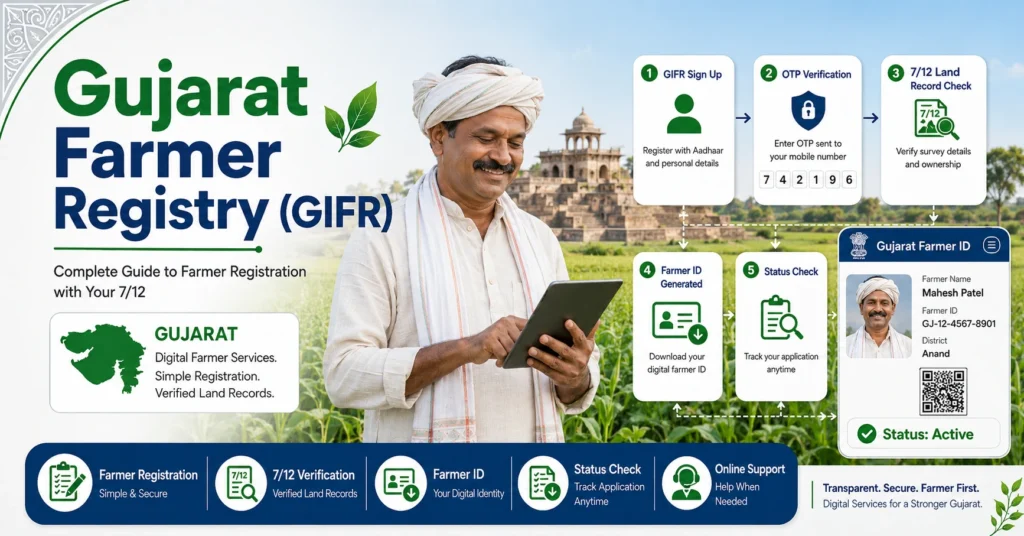
Step 1: Type gifr.agristack.gov.in yourself, confirm the agristack.gov.in ending, select the Farmer option and create your account with Aadhaar OTP eKYC. If the Aadhaar-linked mobile is dead, the fingerprint route at a CSC or through the village computer entrepreneur (VCE) network under e-gram bypasses OTPs, per the biometric section of our registration guide.
Step 2: Set your password, log in with the mobile number, and fill the form: farmer type, category, revenue village confirmed against the 7/12 header rather than the postal name.
Step 3: Add every survey number, village by village. The portal shows the holders against each; select your own name and your share. Gujarat’s joint holdings after family divisions need the standard discipline: your share only, never the whole survey number when co-holders stand recorded. Plots across talukas and districts join one application.
Step 4: Review the summary against your satbara, submit with the final OTP, and keep the enrollment ID safely.
Step 5: Verification runs through the agriculture side and the talati, who owns the village record. Gujarat’s clean records keep approvals quick, often within days; drive weeks and Saurashtra’s complicated tenancy cases run longer. The Farmer ID arrives by SMS, and the QR card downloads from your dashboard as our Farmer ID guide covers.
Camps in Gujarat frequently seat the talati with the gram sevak, the right table for mutation-pending and name-gap cases, and the VCE at the e-gram centre handles village-level registrations where CSC coverage thins.
Login, status check and card download
Log in at gifr.agristack.gov.in with your registered mobile and password; forgot-password rides the Aadhaar-linked number. The public status search takes the enrollment ID or Aadhaar and returns pending, approved, returned or rejected with remarks, each decoded in our status check guide. Escalate month-old pending cases at the taluka agriculture office with your slip. After approval, download and print the card; procurement centres and banks in Gujarat have started asking for the QR.
iKhedut and the Farmer ID: Gujarat’s scheme doorway
iKhedut (ikhedut.gujarat.gov.in) is where Gujarat farmers apply for practically everything: machinery and tractor subsidies, drip and sprinkler under micro-irrigation, horticulture schemes, animal husbandry and fisheries components, with seasonal application windows (arji) and the i-khedut status checks farmers run while waiting for pre-approval and verification visits.
The registry connection follows the national pattern: iKhedut’s farmer applications align to the Farmer Registry, with the ID pulling your verified land into applications that previously demanded 7/12 copies and fresh declarations each time. The practical Gujarat order is now: GIFR registration first, then iKhedut applications in the window, then the status checks. An iKhedut application built on an unregistered identity meets growing friction, and the old habit of applying first and fixing records later reverses the sensible sequence.
Old iKhedut registrations and past application records do not convert into a Farmer ID; the same old-versus-new logic we lay out for UP’s legacy portal applies to Gujarat’s, and the fresh GIFR registration is the step nobody skips.
Gujarat schemes and systems reading the ID
PM-Kisan linking, eKYC and bank seeding gate the central installments here as everywhere, the trio our Farmer ID guide explains.
Mukhyamantri Kisan Sahay style relief and the state’s crop-loss packages after cyclones and unseasonal rain read the registry and crop entries, a live concern in coastal Saurashtra and south Gujarat.
MSP procurement of groundnut, cotton, wheat and tur through state agencies aligns purchase eligibility with recorded holdings and surveyed crops.
The digital crop survey in Gujarat records plot-wise crops each season into the Crop Sown Registry against your ID; confirm entries for every survey number through the gram sevak, especially for horticulture and cotton where insurance rides on them.
Kisan Suryodaya daytime power scheduling and the solar and pump programmes increasingly identify farmers through the registry as rollouts proceed.
Regional notes: Saurashtra to south Gujarat
Saurashtra carries Gujarat’s hardest registration cases: widespread informal tenancy where cultivators till land recorded under others, joint ancestral holdings, and groundnut procurement that reads the registry. Owners should register their records now; tenants wait on the state’s expanding rules, and the tenant-case guidance in our registration guide applies. Kutch adds large holdings, scattered survey numbers and border-district record quirks, making the add-every-plot discipline the local skill. North Gujarat’s dairy-plus-farming households should remember the registry covers the farming identity; dairy society records remain separate. Central Gujarat runs smoothest, records clean and camps frequent. South Gujarat brings orchard and sugarcane holdings, tribal-belt villages where record digitisation completed last, and the report-missing-village route where dropdowns come up short.
The Gujarat portal map: every website explained
gifr.agristack.gov.in is the registry: Farmer ID creation, status, card download.
ikhedut.gujarat.gov.in is the scheme doorway: seasonal application windows, arji status, pre-approval and verification tracking for machinery, micro-irrigation, horticulture and allied schemes.
anyror.gujarat.gov.in (AnyRoR) serves the land records: current 7/12, 8A and index views, the pre-registration check and the post-mutation confirmation, with the e-dhara kendra at the taluka handling the mutation entries themselves.
pmkisan.gov.in runs the central installments and eKYC that the Farmer ID linking now gates.
The e-gram / VCE network brings assisted digital services to village level, the practical route where CSC coverage thins and for fingerprint eKYC when the Aadhaar mobile is broken.
Gujarat’s working order: AnyRoR to verify the record, GIFR to register, crop survey entries confirmed each season, iKhedut in the arji window, pmkisan for the installment trail. Type the addresses yourself; scheme-season ads and lookalike pages fish for Aadhaar details every year.
Gujarat registration in numbers
Gujarat’s registrations moved among the fastest in the country, the payoff of early, thorough record digitisation: when the portal’s record fetch simply works, camps clear villages in days. Central Gujarat and the canal commands registered quickest; the remainder concentrates where this page’s hard cases live, Saurashtra’s informal tenancies that the registry cannot yet hold, Kutch’s scattered large holdings, and the tribal-belt villages digitised last. Low competition in Gujarat searches tells the same story from the outside: the machine works well enough here that fewer people need to write about it, which makes Gujarat one of the smoothest states in India to complete a clean registration, provided the record itself is in order first.
Fixing Gujarat-specific problems
Mutation pending in e-dhara. The registry reads the 7/12 as it stands. Complete the entry through the talati and e-dhara kendra, confirm on AnyRoR, then register or add the plot.
Gujarati record name versus Aadhaar spelling. Small gaps pass; large ones need one side fixed, usually Aadhaar when the record carries the fuller name.
Survey number not found. Wrong taluka selection or a stale copy are the usual causes; village splits and renumbering histories mean the AnyRoR current record is the reference, not an old photocopy.
Application pending during iKhedut window. The deadline collision: escalate with your slip at the taluka office, and next season complete GIFR a month before the arji window opens.
Frequently asked questions: Gujarat Farmer Registry
What is gifr.agristack.gov.in?
It is Gujarat’s official Farmer Registry portal under AgriStack, where farmers register with 7/12 survey numbers for the 11-digit Farmer ID, check status and download the card. Registration is free and this is the only official Gujarat site for it.
Which land records do I need for Gujarat registration?
Current 7/12 and 8A extracts, pulled free from AnyRoR. You add plots by survey number and select your name and share from the displayed holders. All talukas’ plots join one application.
Is iKhedut registration the same as the Farmer ID?
No. iKhedut holds scheme applications; the Farmer ID comes only from GIFR registration. The two are being linked so that iKhedut reads your registry identity, which makes the GIFR-first order the sensible sequence before any application window.
How fast is GIFR approval?
Among the fastest in the country thanks to Gujarat’s clean digital records, often days for clean matches, longer in drive weeks and complicated Saurashtra cases. Escalate beyond a month at the taluka agriculture office.
Can tenant farmers register in Gujarat?
Owner cultivators register against their records now. Tenancy coverage remains limited, a live issue in Saurashtra where informal tenancy is common; watch the state’s expanding rules and consult the gram sevak on what is currently accepted.
My 7/12 shows my late father. What is the Gujarat process?
Complete the varsai (inheritance mutation) through the talati and e-dhara, confirm the record on AnyRoR, then register. Camps with the talati present handle heirs’ cases at one table.
Do I need the Farmer ID for groundnut or cotton procurement?
Procurement eligibility aligns with recorded holdings and crop survey entries against your ID, tightening each season. Register before the season, and confirm your crop entries for every survey number you plan to sell from.
What if my village is missing from the GIFR dropdown?
Check the taluka selection against your 7/12 header first. Genuinely absent villages mean records not yet loaded; report through the gram sevak and register when the village appears, without selecting a lookalike.
How do I check my iKhedut application status?
Through the status check on ikhedut.gujarat.gov.in with your application number, showing pre-approval, verification and sanction stages. That is scheme status; your registry status lives separately on GIFR, and the two read the same identity as linking deepens.
What is the e-dhara kendra and when do I need it?
It is the taluka-level land record office where mutations enter Gujarat’s digital record. Any purchase, inheritance (varsai) or partition passes through it before the 7/12 changes, and the registry can only see your plot after that entry completes. Confirm on AnyRoR, then register.
Disclaimer: agristack.com.in/ is a private informational website with no connection to the Government of India or the Government of Gujarat. Registration happens only on official gov.in portals. Confirm current rules on gifr.agristack.gov.in or at your taluka agriculture office before acting.